

Reading Eyelink Data#
Imagine a simple memory task: on each trial, after a brief fixation period, we present a string of letters (e.g., XFABWS) and ask participants to memorize them. Then, after a retention interval, we present a probe letter (e.g., A) and ask if this letter belongs to the presented letters.
While simple, the task is representative of a typical task used in psychological experiments: the repeated presentation of trials, with each trial consisting of several successive components.
The trial flow looks like this:

Read Data#
What does the eye-tracking data in this task look like? Here, we will work with eye movement data recorded by the popular Eyelink system. Eyelink saves data in its proprietary .edf format, but it can be easily converted to a text file in .asc format. PupEyes reads the converted .asc files so make sure you convert your files beforehand.
An .asc file can be opened with a text editor. Here is a snippet of an example file:
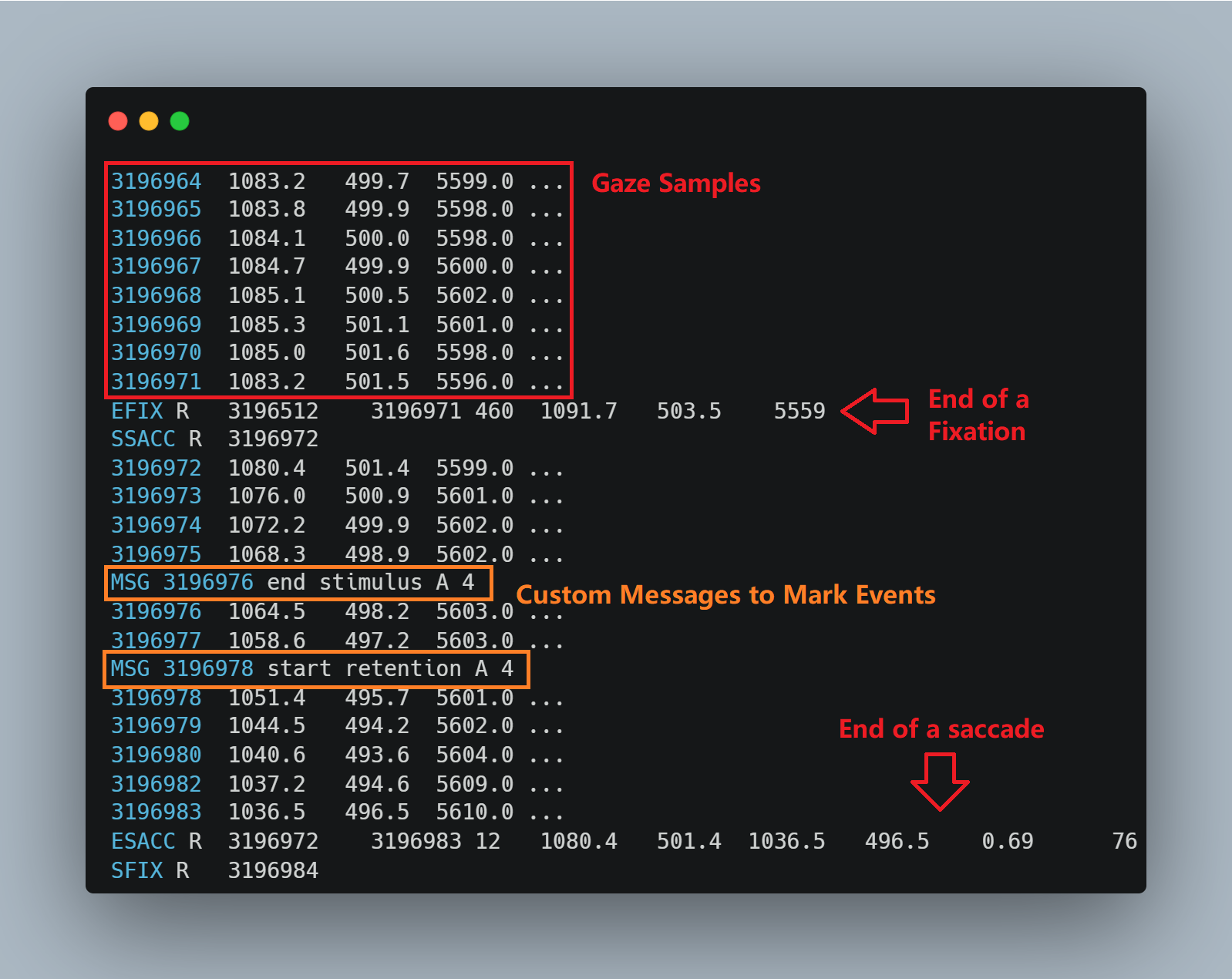
Most rows consist of raw gaze samples recorded at a certain sampling rate (e.g., 1000 Hz). The four columns indicate the timestamp, x and y coordinates, and pupil size, respectively.
Mixed with those raw gaze samples is information about fixations, saccades, and blinks automatically detected during recording. In this snippet, SFIX and EFIX indicate the start and the end of a fixation, respectively. SSACC and ESACC indicate the start and the end of a saccade, respectively.
Rows with an MSG prefix are event markers that the researcher sent during the task using custom code. These markers are important because they link data to task events. In our task, we sent a marker at the start and the end of each component within a trial, like below:
Marker |
Event |
Block |
Trial |
|---|---|---|---|
start |
fixation |
A |
4 |
end |
fixation |
A |
4 |
start |
stimulus |
A |
4 |
end |
stimulus |
A |
4 |
start |
retention |
A |
4 |
end |
retention |
A |
4 |
start |
probe |
A |
4 |
end |
probe |
A |
4 |
start |
feedback |
A |
4 |
end |
feedback |
A |
4 |
Understanding your event markers is critical for correctly parsing the raw data. Specifically, PupEyes needs to understand two things about your event markers:
The format of your event markers. For example, if your event markers are like “start retention A 4”, then the event markers consist of four parts: marker (start/end), the specific event, block ID, and trial ID. The delimiter is a space.
The notations for trial boundary. In our case, a trial always starts with “start fixation X X” and ends with “end feedback X X”. So the boundary is “start fixation” and “end feedback”.
# file name
path = 'data/sub001.asc'

# event marker format, specified as a dictionary {name: data type}
msg_format = {'marker':str, 'event':str, 'block':str, 'trial':int} # e.g., start retention A 4
delimiter = ' ' # delimiter for messages

# start and stop notations for each trial
start_msg = 'start fixation'
stop_msg = 'end feedback'

# If you have any constant columns that you want to add
add_cols = {'subject':'sub001', 'condition': 'low'}
Once you have the required information, simply pass it to EyelinkReader:
import pupeyes as pe

raw = pe.EyelinkReader(path=path,
                       start_msg=start_msg,
                       stop_msg=stop_msg,
                       msg_format=msg_format,
                       delimiter=delimiter,
                       add_cols=add_cols
                      )
Tip
When building your task, consider where you need an event marker and how to format it so that the messages can be correctly parsed.
If your task consists of multiple events within each trial (like the one here), it may make sense to mark each event’s start and end. Better safe than sorry!
If you only want data for a part of the trial, simply change
start_msgand/orstop_msg.
Get Gaze Samples#
Once we create an EyelinkReader instance, getting raw gaze samples is easy:
samples = raw.get_samples()
samples.head(5) # showing the first 5 rows
| trialtime | trackertime | x | y | pp | msg | msgtime | marker | event | block | trial | subject | condition | |
|---|---|---|---|---|---|---|---|---|---|---|---|---|---|
| 0 | 0 | 3148741 | 856.9 | 424.4 | 5545 | start fixation A 1 | 3148741 | start | fixation | A | 1 | sub001 | low |
| 1 | 1 | 3148742 | 857.5 | 425.9 | 5546 | start fixation A 1 | 3148741 | start | fixation | A | 1 | sub001 | low |
| 2 | 2 | 3148743 | 858.0 | 427.2 | 5547 | start fixation A 1 | 3148741 | start | fixation | A | 1 | sub001 | low |
| 3 | 3 | 3148744 | 858.2 | 427.2 | 5547 | start fixation A 1 | 3148741 | start | fixation | A | 1 | sub001 | low |
| 4 | 4 | 3148745 | 857.9 | 427.1 | 5545 | start fixation A 1 | 3148741 | start | fixation | A | 1 | sub001 | low |
.get_samples() returns a pandas dataframe with each row indicating one gaze sample.
trialtime: Timestamps during a trial. Reset to 0 for every new trial (i.e., what the user provides as the start message).trackertime: Timestamps as recorded by Eyelink. Does not reset.xandy: gaze position in Eyelink coordinates (pixels with (0,0) being the top-left corner).pp: pupil size in arbitrary unit (either AREA of DIAMETER, depending on Eyelink setting).msg: event marker message.msgtime: the timestamp of the event marker message.marker,event,block, andtrial: parsed event markers according to user specification.subjectandcondition: constant columns added by user.
Now you have the data in an analysis-friendly format, you are set to start whatever analysis you want. Check out the vast data processing methods pandas offers.
Note that PupEyes comes with comprehensive functionalities for pupil size preprocessing, which will be introduced in Pupil Preprocessing.
Get Fixation Data#
Just like how we got the gaze samples:
fixations = raw.get_fixations()
fixations.head(5) # showing the first 5 rows
| eye | starttime | endtime | duration | endx | endy | msg | msgtime | marker | event | block | trial | subject | condition | |
|---|---|---|---|---|---|---|---|---|---|---|---|---|---|---|
| 0 | R | 3148925 | 3149062 | 138 | 635.4 | 463.2 | start fixation A 1 | 3148741 | start | fixation | A | 1 | sub001 | low |
| 1 | R | 3149898 | 3149941 | 44 | 655.5 | 1233.8 | start stimulus A 1 | 3149725 | start | stimulus | A | 1 | sub001 | low |
| 2 | R | 3149984 | 3150025 | 42 | 733.8 | 691.1 | start stimulus A 1 | 3149725 | start | stimulus | A | 1 | sub001 | low |
| 3 | R | 3150067 | 3150187 | 121 | 770.1 | 438.0 | start stimulus A 1 | 3149725 | start | stimulus | A | 1 | sub001 | low |
| 4 | R | 3150205 | 3150355 | 151 | 717.9 | 486.4 | start stimulus A 1 | 3149725 | start | stimulus | A | 1 | sub001 | low |
.get_fixations() returns a pandas dataframe with each row showing one fixation, as detected by Eyelink.
eye: which eye is recorded for this fixation.starttimeandendtime: Start and end times for this fixation.duration: Fixation duration in milliseconds.endxandendy: Fixation position in Eyelink coordinates (pixels with (0,0) being the top-left corner).
The rest are the same as the pupil size data.
Get Saccade Data#
saccades = raw.get_saccades()
saccades.head(5) # showing the first 5 rows
| eye | starttime | endtime | duration | startx | starty | endx | endy | ampl | pv | msg | msgtime | srt | marker | event | block | trial | subject | condition | |
|---|---|---|---|---|---|---|---|---|---|---|---|---|---|---|---|---|---|---|---|
| 0 | R | 3148894 | 3148924 | 31 | 861.1 | 432.3 | 632.5 | 466.4 | 3.61 | 223\n | start fixation A 1 | 3148741 | 153 | start | fixation | A | 1 | sub001 | low |
| 1 | R | 3149063 | 3149095 | 33 | 632.9 | 465.2 | 965.4 | 473.1 | 5.20 | 299\n | start fixation A 1 | 3148741 | 322 | start | fixation | A | 1 | sub001 | low |
| 2 | R | 3149846 | 3149897 | 52 | 958.4 | 495.0 | 667.1 | 1211.3 | 11.94 | 460\n | start stimulus A 1 | 3149725 | 121 | start | stimulus | A | 1 | sub001 | low |
| 3 | R | 3149942 | 3149983 | 42 | 649.1 | 1231.9 | 741.0 | 690.7 | 8.44 | 528\n | start stimulus A 1 | 3149725 | 217 | start | stimulus | A | 1 | sub001 | low |
| 4 | R | 3150026 | 3150066 | 41 | 727.7 | 688.8 | 772.0 | 461.0 | 3.63 | 398\n | start stimulus A 1 | 3149725 | 301 | start | stimulus | A | 1 | sub001 | low |
.get_saccades() returns a pandas dataframe with each row showing one saccade, as detected by Eyelink.
eye: which eye is recorded for this saccade.starttimeandendtime: Start and end times for this saccade.duration: Saccade duration in milliseconds.startx,starty,endxandendy: Saccade start and end positions in Eyelink coordinates (pixels with (0,0) being the top-left corner).ampl: Saccade amplitude (i.e., total visual angle covered in the saccade).pv: Saccade peak velocity.srt: Saccade latency, calculated as the difference between saccade start timestarttimeand message timestampmsgtime.
The rest are the same as the pupil size data.
Get Blinks#
blinks = raw.get_blinks()
blinks.head(5) # showing the first 5 rows
| eye | starttime | endtime | duration | msg | msgtime | marker | event | block | trial | |
|---|---|---|---|---|---|---|---|---|---|---|
| 0 | R | 3153626 | 3153732 | 107 | start retention A 1 | 3152725 | start | retention | A | 1 |
| 1 | R | 3155486 | 3155664 | 179 | start retention A 1 | 3152725 | start | retention | A | 1 |
| 2 | R | 3156508 | 3156675 | 168 | start retention A 1 | 3152725 | start | retention | A | 1 |
| 3 | R | 3158260 | 3158409 | 150 | start retention A 1 | 3152725 | start | retention | A | 1 |
| 4 | R | 3160026 | 3160238 | 213 | start retention A 1 | 3152725 | start | retention | A | 1 |
.get_blinks() returns a pandas dataframe with each row showing one blink, as detected by Eyelink.
eye: which eye is recorded for this blink.starttimeandendtime: Start and end times for this blink.duration: Saccade duration in milliseconds.
The rest are the same as the pupil size data.
Get Custom Messages#
You can also get the custom messages that define your trials to use in further analyses.
messages = raw.get_messages()
messages.head(5)
| id | trackertime | message | marker | event | block | trial | subject | condition | |
|---|---|---|---|---|---|---|---|---|---|
| 0 | 0 | 3148741 | start fixation A 1 | start | fixation | A | 1 | sub001 | low |
| 1 | 0 | 3149723 | end fixation A 1 | end | fixation | A | 1 | sub001 | low |
| 2 | 0 | 3149725 | start stimulus A 1 | start | stimulus | A | 1 | sub001 | low |
| 3 | 0 | 3152724 | end stimulus A 1 | end | stimulus | A | 1 | sub001 | low |
| 4 | 0 | 3152725 | start retention A 1 | start | retention | A | 1 | sub001 | low |
Metadata#
PupEyes also stores the metadata, which can be useful for checking calibration quality, sampling rate, pupil size unit, etc.
For example, we can see that two 5-point calibrations were performed. The first resulted in an aborted validation, and the second resulted in a successful validation.
raw.metadata
{'CALIBRATION_TYPE': ['HV5', 'HV5'],
 'CALIBRATION_EYE': ['R', 'R'],
 'CALIBRATION_RESULT': ['GOOD', 'GOOD'],
 'VALIDATION_TYPE': ['ABORTED', 'HV5'],
 'VALIDATION_EYE': ['R', 'R'],
 'VALIDATION_RESULT': ['ABORTED', 'GOOD'],
 'TRACKING_MODE': ['CR'],
 'SAMPLING_RATE': ['1000'],
 'FILE_SAMPLE_FILTER': ['2'],
 'LINK_SAMPLE_FILTER': ['0'],
 'EYE_RECORDED': ['R'],
 'MOUNT_CONFIG': ['MTABLER'],
 'GAZE_COORDS': [['0.00', '0.00', '1920.00', '1080.00']],
 'PUPIL': ['DIAMETER'],
 'PUPIL_TRACKING_ALGORITHM': ['CENTROID']}
Reading Data from Multiple Participants#
PupEyes can be used together with basic Python syntax, such as a for loop.
Suppose we have files named sub001.asc, sub002.asc…etc. We can use a wildcard to loop through all files ending with .asc, extract data for each, and then combine them into a single dataframe.
from glob import glob
from os.path import basename

# empty list to store individual subject's data
list_of_data = []

# loop through files based on specified file name pattern
for path in glob('data/*.asc'):

    # extract subject id from filename
    participant = basename(path)[:-4]

    # load Eyelink asc file
    raw_subject = pe.EyelinkReader(path=path, start_msg=start_msg, stop_msg=stop_msg, msg_format=msg_format, delimiter=delimiter, add_cols={'participant':participant})

    # get fixations for this subject
    fixations_subject = raw_subject.get_fixations()

    # append data to the list
    list_of_data.append(fixations_subject)
Then, you just need to concatenate the list of data into a single pandas dataframe:
import pandas as pd

# concatenate
fixations_all = pd.concat(list_of_data, ignore_index=True) # ignore_index = True so that index match the number of rows!
fixations_all
| eye | starttime | endtime | duration | endx | endy | msg | msgtime | marker | event | block | trial | participant | |
|---|---|---|---|---|---|---|---|---|---|---|---|---|---|
| 0 | R | 3441800 | 3441859 | 60 | 951.6 | 543.3 | start fixation A 1 | 3441313 | start | fixation | A | 1 | sub003 |
| 1 | R | 3442056 | 3442085 | 30 | 935.2 | 555.5 | start fixation A 1 | 3441313 | start | fixation | A | 1 | sub003 |
| 2 | R | 3442472 | 3442711 | 240 | 970.6 | 520.4 | start stimulus A 1 | 3442286 | start | stimulus | A | 1 | sub003 |
| 3 | R | 3442731 | 3442913 | 183 | 922.8 | 534.4 | start stimulus A 1 | 3442286 | start | stimulus | A | 1 | sub003 |
| 4 | R | 3442928 | 3443236 | 309 | 975.8 | 540.3 | start stimulus A 1 | 3442286 | start | stimulus | A | 1 | sub003 |
| ... | ... | ... | ... | ... | ... | ... | ... | ... | ... | ... | ... | ... | ... |
| 1310 | R | 3227521 | 3227696 | 176 | 881.1 | 589.9 | start probe A 10 | 3226693 | start | probe | A | 10 | sub004 |
| 1311 | R | 3227711 | 3228124 | 414 | 928.1 | 584.4 | start probe A 10 | 3226693 | start | probe | A | 10 | sub004 |
| 1312 | R | 3228706 | 3229031 | 326 | 879.0 | 574.1 | start feedback A 10 | 3228381 | start | feedback | A | 10 | sub004 |
| 1313 | R | 3229040 | 3229076 | 37 | 853.2 | 575.2 | start feedback A 10 | 3228381 | start | feedback | A | 10 | sub004 |
| 1314 | R | 3229303 | 3229337 | 35 | 861.0 | 594.1 | start feedback A 10 | 3228381 | start | feedback | A | 10 | sub004 |
1315 rows × 13 columns
Warning
When using pd.concat to concatenate a list of files, make sure to set ignore_index=True so that the index matches the number of rows. Some preprocessing functions, such as .deblink(), require unique indices for each row.
Below is a full example of extracting and concatenating gaze data from individual data files and save the data to csv.
import pandas as pd
import pupeyes as pe
from glob import glob
from os.path import basename

# event marker format, specified as a dictionary {name: data type}
msg_format = {'marker':str, 'event':str, 'block':str, 'trial':int} # e.g., start retention A 4
delimiter = ' ' # delimiter for messages

# start and stop notations for each trial
start_msg = 'start fixation'
stop_msg = 'end feedback'

# empty list to store individual subject's data
list_of_data = []

# loop through files based on specified file name pattern
for path in glob('data/*.asc'):

    # extract subject id from filename
    participant = basename(path)[:-4]

    # load Eyelink asc file
    raw_subject = pe.EyelinkReader(path=path, start_msg=start_msg, stop_msg=stop_msg, msg_format=msg_format, delimiter=delimiter, add_cols={'participant':participant}, progress_bar=False)

    # get fixations for this subject
    samples_subject = raw_subject.get_samples()

    # append data to the list
    list_of_data.append(samples_subject)

# concatenate dataframes
samples = pd.concat(list_of_data, ignore_index=True)

# save to csv
samples.to_csv('data/samples.csv', index=False)
See also
A comprehensive introduction to Eyelink data: https://www.sr-research.com/support/thread-7675.html
That whole support forum is a trove of treasures, and I recommend it to anyone who wishes to do eye-tracking with Eyelink.
Convert to Trial-based Format#
In PupEyes, one row represents one sample/fixation/saccade/blink. This is intuitive but for large datasets, this could result in many rows. Furthermore, some columns, such as trial ID, block, condition, etc., remain constant for all rows within a single trial. For these reasons, some may prefer a trial-based format where each row represents one trial, instead of one sample. This conversion can be easily done:
# each row is one sample
samples.head()
| trialtime | trackertime | x | y | pp | msg | msgtime | marker | event | block | trial | participant | |
|---|---|---|---|---|---|---|---|---|---|---|---|---|
| 0 | 0 | 3441313 | 780.9 | 470.9 | 5143 | start fixation A 1 | 3441313 | start | fixation | A | 1 | sub003 |
| 1 | 1 | 3441314 | 782.4 | 471.5 | 5141 | start fixation A 1 | 3441313 | start | fixation | A | 1 | sub003 |
| 2 | 2 | 3441315 | 783.6 | 472.3 | 5143 | start fixation A 1 | 3441313 | start | fixation | A | 1 | sub003 |
| 3 | 3 | 3441316 | 784.4 | 472.5 | 5144 | start fixation A 1 | 3441313 | start | fixation | A | 1 | sub003 |
| 4 | 4 | 3441317 | 786.1 | 472.0 | 5145 | start fixation A 1 | 3441313 | start | fixation | A | 1 | sub003 |
# each row is one trial
samples_trial = samples.groupby(['participant','block','trial']).agg(
    {'trialtime': lambda x: x.tolist(),
     'trackertime': lambda x: x.tolist(),
     'pp': lambda x: x.tolist(),
     'x': lambda x: x.tolist(),
     'y': lambda x: x.tolist(),
     'pp': lambda x: x.tolist(),
     'msg': lambda x: x.tolist()
     }
).reset_index()
samples_trial.head()
| participant | block | trial | trialtime | trackertime | pp | x | y | msg | |
|---|---|---|---|---|---|---|---|---|---|
| 0 | sub001 | A | 1 | [0, 1, 2, 3, 4, 5, 6, 7, 8, 9, 10, 11, 12, 13,... | [3148741, 3148742, 3148743, 3148744, 3148745, ... | [5545, 5546, 5547, 5547, 5545, 5544, 5545, 554... | [856.9, 857.5, 858.0, 858.2, 857.9, 857.8, 857... | [424.4, 425.9, 427.2, 427.2, 427.1, 427.1, 426... | [start fixation A 1, start fixation A 1, start... |
| 1 | sub001 | A | 2 | [0, 1, 2, 3, 4, 5, 6, 7, 8, 9, 10, 11, 12, 13,... | [3171475, 3171476, 3171477, 3171478, 3171479, ... | [5399, 5399, 5394, 5390, 5389, 5389, 5389, 538... | [878.0, 878.0, 877.9, 877.9, 877.5, 877.2, 876... | [490.6, 490.7, 491.8, 492.8, 493.6, 493.5, 493... | [start fixation A 2, start fixation A 2, start... |
| 2 | sub001 | A | 3 | [0, 1, 2, 3, 4, 5, 6, 7, 8, 9, 10, 11, 12, 13,... | [3182009, 3182010, 3182011, 3182012, 3182013, ... | [5098, 5099, 5099, 5099, 5099, 5101, 5104, 510... | [910.6, 910.9, 912.5, 914.2, 915.8, 915.9, 915... | [501.4, 502.2, 502.2, 499.2, 496.1, 493.1, 493... | [start fixation A 3, start fixation A 3, start... |
| 3 | sub001 | A | 4 | [0, 1, 2, 3, 4, 5, 6, 7, 8, 9, 10, 11, 12, 13,... | [3192977, 3192978, 3192979, 3192980, 3192981, ... | [5905, 5905, 5905, 5904, 5903, 5902, 5901, 590... | [803.2, 802.8, 802.2, 801.7, 802.0, 802.6, 803... | [540.2, 540.3, 539.5, 538.7, 538.4, 538.9, 539... | [start fixation A 4, start fixation A 4, start... |
| 4 | sub001 | A | 5 | [0, 1, 2, 3, 4, 5, 6, 7, 8, 9, 10, 11, 12, 13,... | [3215642, 3215643, 3215644, 3215645, 3215646, ... | [5643, 5642, 5641, 5640, 5643, 5647, 5650, 564... | [814.9, 814.8, 814.7, 814.8, 814.8, 815.0, 815... | [504.8, 505.3, 505.3, 505.4, 505.3, 504.5, 503... | [start fixation A 5, start fixation A 5, start... |
The resulted dataframe can be used in packages such as DataMatrix and timeseries-test for further analyses.